Install: from CD
A3000, A4000 or A4000T, Z3660 with a real 68060 or 68LC060, plus an A4091 or A4092. The packages come from a CD; the installer boots from a small disk image on the Z3660 SD card. Interactive only.
You need
- a working K1 card. It carries the CD installer disk and presets 4–7;
- one CD image, by where the system goes:
…public060-sd-full….iso: a disk image on the Z3660 SD card, installed at unit 0 (it boots from any unit afterwards);…public060-a4092root-full….iso: a blank disk behind the A4092 at SCSI id 1 (Amix: id 9).
Onto the SD card: the card's cd-target.hdf is 200 MB: enough for set 1, too small
for set 2. For set 2, replace it with the 512, 900 or 1000 MB empty image, or a ZuluSCSI
Create_ file. See the disk sizes.
1. Serve the CD
- A SCSI CD-ROM drive on the A4091/A4092 at SCSI id 3, or a ZuluSCSI serving the image at id 3.
- ZuluSCSI: name the image
CD3.iso. Leave unit attention off. - The CD is never booted. Never
ddorfsckits device: it wedges the bus until power-off.
2. Select the CD preset
Set presets/preset.txt to preset 4 (system on the SD card) or
preset 6 (system behind the A4092).
| Preset | Name | Use |
|---|---|---|
| 4 | CD install to SD | install onto Z3660 unit 0 |
| 5 | CD system on SD | the installed system |
| 6 | CD install, A4092 root | install onto a blank disk at A4092 id 1 |
| 7 | A4092 root system | the installed system |
Preset 4 with an Amix disk on the A4092: if an Amix system is already installed on an A4092 disk, take that disk off the bus before the CD-to-SD install. Its boot partition (priority 2) boots ahead of the CD boot disk (priority 1). Alternatives, untested by us: hold the left mouse button at power-on to bypass the A4092 ROM; pick the boot device in Kickstart's early-startup menu (both mouse buttons); lower the partition's boot priority in HDToolBox.
3. Install
Power on. The installer starts by itself and finds the CD: Installing from the CD-ROM drive at 1,3.
Wait for each question to appear before you type; keys pressed while the system is still starting are lost.
| Prompt | Answer |
|---|---|
Which keyboard are you using? [12] | RETURN (American), or your map's number |
Do you want to install or repair? [install] | RETURN |
What is the SCSI id of the disk you want to install? | the target — asked only when there is a choice |
How many megabytes for the root file system? [158] | RETURN |
How many megabytes for the swap partition? [30] | RETURN (30 is the minimum) |
Choose: [1] | RETURN (Standard Amiga UNIX installation, 17 packages); 2 everything on the disc (30) |
Verbose install? [n] | RETURN |
Do you wish to change any of these? [n] | RETURN — check Install to: first |
Press RETURN to halt the system. | RETURN |
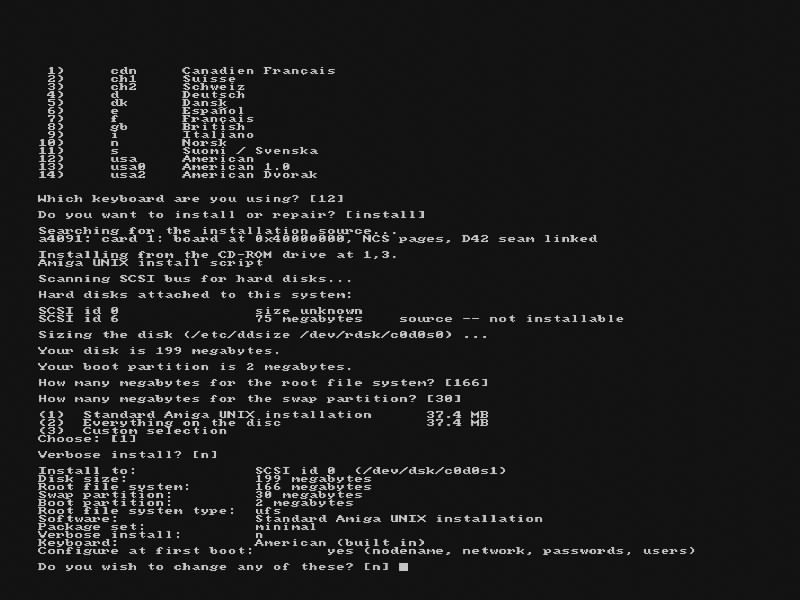
source -- not installable is the installer disk.4. First boot
Set 1 takes about 35 minutes, set 2 just under 2 hours (measured on an A4000D with the 68060 at 100 MHz). Wait 10 seconds after the halt message and switch off.
Set preset 5 (SD) or
preset 7 (A4092 root) and power on. Then the
first-boot dialog; log in as root.
A system behind the A4092
The A4092's ROM does not offer Amix partitions to Kickstart, so the system starts from
boot-a4092.hdf on the Z3660. It ships empty and unbootable; the installer writes the boot
chain onto it and arms it. Keep it at unit 5 (preset 7) from then on.
Switching off: as root, shutdown -i0 -g0 -y, then wait 10 seconds after
the halt message. Never reboot or shutdown -i6 on a real 68060: the Z3660 cannot
reset the CPU.
Stuck? Report it in jusii/amigaux; see Support.